Ethernet
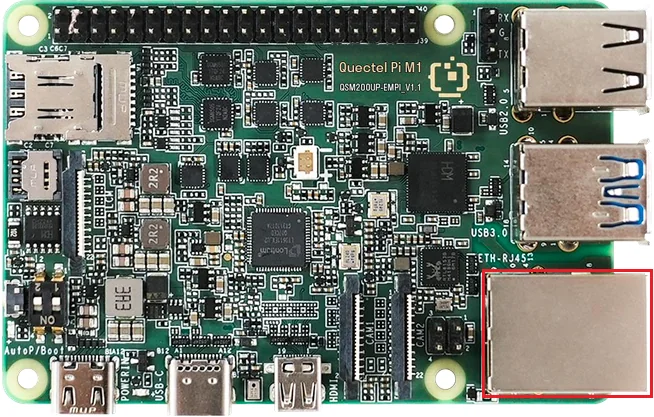
Quectel Pi M1 smart main control board provides one standard RJ45 port and supports Ethernet communication at 10/100/1000 Mbps.
Ethernet cable requirement: only straight-through Ethernet cables are supported; crossover cables are not supported.
Hardware Interface
Function Usage
View Network Configuration
DHCP is enabled by default in the system to automatically obtain the network configuration.
Enter the
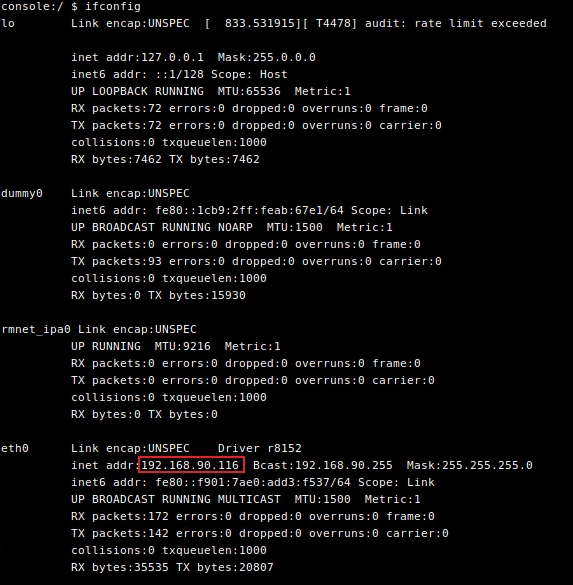
ifconfigcommand in the terminal to view the network interface address:
ifconfig
Output example: the
192.168.90.116shown afterinet addr:is the local IP address.
Enter the
ip routecommand in the terminal to view network routing information:
ip route
Output example:

View the DNS server address:
dumpsys connectivity | grep -o ' DnsAddresses: \\[[^]]*\\]'
Output example:

Test the Network
**Run theping**command to test the network connection
Run the
ping 8.8.8.8command. If the ping succeeds and responses are received, the external network connection is normal.Run the
ping www.example.comcommand. If the ping succeeds, the external network connection is normal and the DNS resolution function is working properly.